Your real home IP, everywhere
Not a shared proxy. Not a rented datacenter IP. Your actual home residential IP address — stable, genuine, and never flagged.
Keep your real residential home IP address no matter where you travel. Browse, work and connect exactly as if you never left home — seamlessly and privately.
Three steps stand between you and a home IP that follows you anywhere on earth.
Plug the small home device into your router before you leave. It anchors your real residential IP and creates a private, encrypted tunnel home.
Carry the pocket-sized travel unit — or load the residential IP config on your laptop. It links straight back to your home connection over the tunnel.
Every site, employer tool and banking app sees your normal home IP address. No datacenter flags, no geo-blocks, nothing unusual to detect.
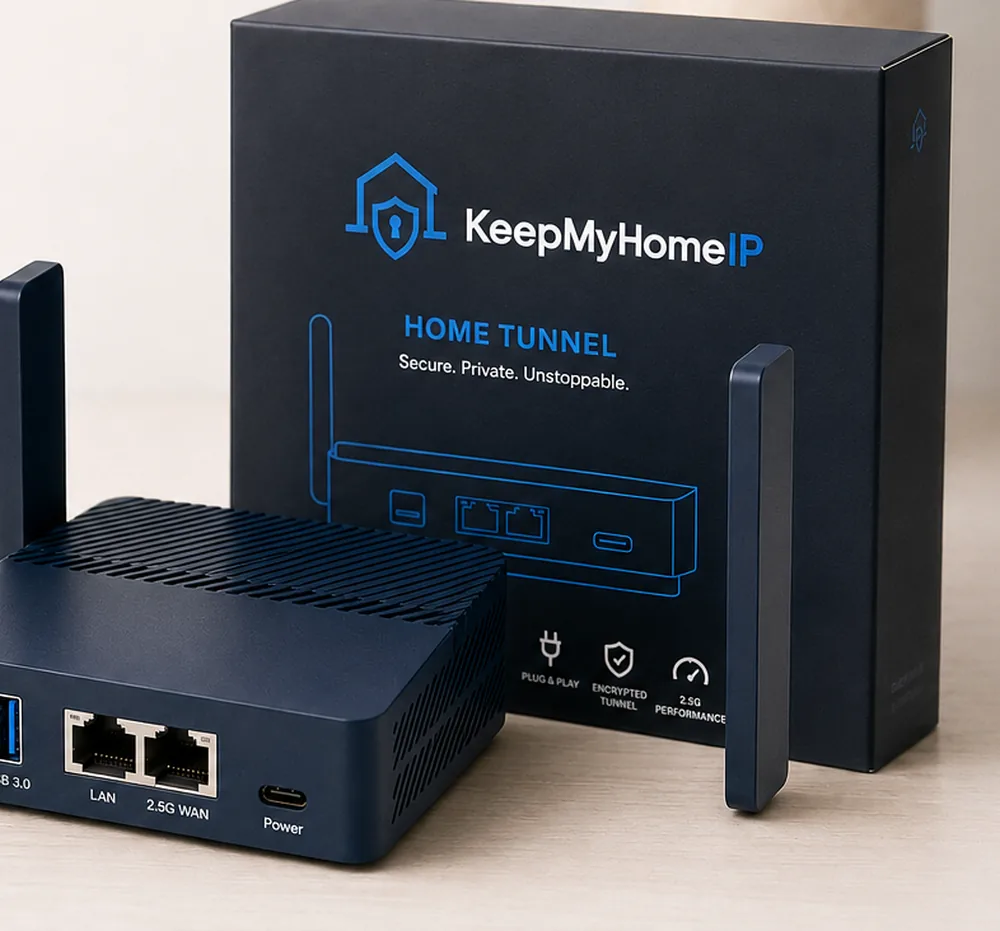
The Full Home Tunnel Kit is real hardware — a pocket-sized home unit and a travel unit, pre-configured and ready to plug in. No apps to fight, no accounts to detect.
Built for professionals who need reliability, privacy, and peace of mind — not a patchwork of workarounds.
Not a shared proxy. Not a rented datacenter IP. Your actual home residential IP address — stable, genuine, and never flagged.
VPN IPs rotate, get blacklisted, and raise red flags. KeepMyHomeIP gives you the same consistent IP your employer has always known.
Works seamlessly with Okta, corporate VPNs, Slack, Zoom, SSO, and any system that validates access by location or IP.
Optimized routing keeps lag minimal for video calls, real-time collaboration, and cloud tools. Your home bandwidth, your home speed.
Not a temporary hack. KeepMyHomeIP is engineered for professionals who work remotely for months or years, across many countries.
Traffic routes through your own home connection — not shared servers or third-party infrastructure. Your data stays yours.
Whether you're working abroad for a season or traveling indefinitely, KeepMyHomeIP has your back.
You're employed locally but living in another country. KeepMyHomeIP keeps your IP consistent so employer systems, HR tools, and payroll platforms never flag an anomaly.
You move every few weeks. VPNs fail, geo-restrictions follow you, and client systems question your location. KeepMyHomeIP gives you a permanent, reliable home base — digitally speaking.
Your contracts specify location requirements or clients restrict platform access by country. Stay compliant and connected without renegotiating every time you move.
You live between countries or travel for extended periods. Keep access to home banking, streaming, insurance portals, and services that are IP-locked to your home country.
Searching for KeepYourHomeIP or KYHIP? Here’s how keeping your real home IP with KeepMyHomeIP stacks up against the alternatives people usually try.
| KeepMyHomeIP | Typical VPN | Residential proxy | |
|---|---|---|---|
| What IP you actually get | Your own real home IP | Shared datacenter IP | A stranger's residential IP |
| Employer, bank & Okta checks | Nothing to detect — it is your IP | Frequently flagged and blocked | Often flagged as a proxy |
| Consistency | The same home IP every time | Rotates and changes | Pooled and rotating |
| Setup | Plug-and-play kit or config file | Install an app | Manage proxy lists |
| Privacy | Your own connection, no shared pool | Shared servers | Shared residential pool |
KeepYourHomeIP (KYHIP) is a separate provider and we can’t speak to their exact specs — always compare for your own setup. The comparison above is against VPNs and residential-proxy services in general.
Choose the plug-and-play hardware kit, or ready-made residential IP config files. Transparent pricing, no surprises.
Hardware · two devices
$299.99 one-time
Home unit + travel unit · 30-day money-back guarantee
Get the kitConfiguration files only
$49.99 /month
No hardware · delivered as ready-to-load config files
Get residential IPNot sure which fits your setup? Take the 2-minute quiz and we'll point you to the right one.
Real professionals, real locations, zero employer flags.
I've been working from Southeast Asia for eight months. My employer's Okta SSO and corporate VPN never flagged a thing. Wish I'd found this sooner.
Setup took under 10 minutes. I'm a product manager working remotely from Portugal — Zoom, Slack, and our internal tools all think I'm in London. Flawless.
Tried two VPN services first. Both got flagged within weeks. KeepMyHomeIP has been running for five months without a single issue. The real home IP makes all the difference.
A residential IP address is an IP assigned by an Internet Service Provider (ISP) to a home connection. Unlike datacenter IPs used by VPNs, residential IPs appear as regular home internet connections and are not flagged by corporate systems, geo-restriction filters, or fraud detection tools.
VPNs route your traffic through shared datacenter servers, which are easily detectable and frequently blocked. KeepMyHomeIP routes your traffic through your actual home internet connection, so your IP address remains your real home IP — completely indistinguishable from being home.
Yes. A traditional VPN swaps your IP for a shared datacenter address that employers and banks can flag. KeepMyHomeIP does the opposite — it keeps your real home IP by securely tunnelling back to your own home internet connection, so the IP you show anywhere you travel is the exact residential IP you have at home.
You have two options. The Full Home Tunnel Kit includes a small travel device that links back to the home unit plugged into your router — fully plug-and-play. Or, with the Residential IP plan, you load ready-made configuration files onto your laptop, phone or router with no extra hardware. Either way your home IP address travels with you.
Yes. KeepMyHomeIP uses your own home connection, not shared infrastructure. You're simply maintaining access to your home network remotely — the same way a VPN is used, but with your real home IP. It is legal in the vast majority of jurisdictions and complies with standard remote access practices.
Your employer will see your home IP address — exactly the same IP they've always seen. There is nothing unusual to detect. Unlike VPNs, your connection does not pass through foreign datacenters or shared proxy pools.
Speed depends on your home internet plan and the physical distance from your home. For most professional tasks — video calls, cloud tools, coding — performance is fully adequate. We recommend a home connection of at least 25 Mbps upload for smooth operation.
Setup is plug-and-play for most users. A small device connects to your home router, and you access it securely from anywhere. Our quiz helps you find the right configuration for your setup in under 2 minutes.
KeepMyHomeIP is designed for exactly this use case. No matter how often you change locations — or how many countries you travel through — your IP address remains your home IP, stable and consistent.
Set up the home unit on your router before you leave — or load the residential IP config on your laptop. From then on, everywhere you travel your traffic tunnels back through your home connection, so websites, your employer and banks see your normal home IP address no matter which country you are actually in.
Practical guides on IP addresses, remote-work compliance, digital-nomad setups, and privacy.
A plain-language breakdown of IP address types, why employers and platforms distinguish between them, and what that means for you.
Read article →From connectivity and hardware to IP management and security — everything a nomad needs to work professionally from anywhere.
Read article →VPNs were built for office networks, not for professionals living across borders. Here is what is actually happening under the hood.
Read article →Set up in under ten minutes and work from anywhere — with the same residential IP your employer, bank and apps already trust.
30-day money-back guarantee on the Full Home Tunnel Kit
Questions before buying? Setup help? Not sure our solution fits your situation? Reach out — every message is confidential and handled with discretion.
Your email client should have opened. We'll reply at the address you provided, usually within one business day.